STAY WITH US

test banner

Curriki page

Online books

We sale books, online any one you want!

Our student must learn how to read and write

Education must move forward!

We are always prepeared for the future

Your future must be better neither with a scholarship to the university.

Your must be brilant as this once

They are the best among the best!

Sunday, 24 November 2019

Fish Meal


This air fish meals  

Tuesday, 12 September 2017

How to keep your body fit

Keeping Fit
How to Keep Your Body Fit

Fitness is just as imperative as health. As a matter of fact, fitness is linked directly with your health. If you are not taking care of your body, you will get sick. Here are some great suggestions that will help you to keep your body fit:
1. Bicycling
It is a sad thing that many people do not take advantage of this excellent option for exercise. Bike riding exercise your body and build a stronger cardiovascular system. Also, it allows you to get out and enjoy nature and fresh air.
2. Jogging or Walking
Both jogging and walking are wonderful ways to get fit. They tone the muscles, relieve stress, create a healthier heart, and improve lung capability.
3. Swimming
Swimming is an exceptional way to get into and stay in shape. Swimming will help you tighten your body, lose weight, and get a good overall workout.
4. Tennis
Tennis is a great way to exercise. Just running after the ball alone will help get you into shape. This is a great way to strengthen your cardiovascular system and lose weight.
5. Dancing
Dancing is so much fun and as long as you are moving, it really does not matter what type of dance or music. The whole idea is to move your body. Dancing has long been recommended as an avenue to fitness.
6. VCR
If you have a VCR or DVD, try sticking in some good workout tapes. Even taking 15 minutes every day to workout will get you started. Try that for two weeks and you will be surprised at the results.
7. Abdominal Crunches
Crunches have long been a favorite for many athletes for the very reason that they work. Lying on your back with knees bent, keeping feet flat on the floor, cross your hands across your chest and then curl your torso, rolling from your sternum toward your hips. Do this slowly and start out with a set of ten crunches in three reps. As you get accustomed to these, you can increase both the number of sets and reps.
8. Squats
Squats are excellent for glutes, hamstrings, quads, and calves. With your feet standing firm and spread apart about two feet, bend your knees slightly. Then, very smoothly, you will squat toward the floor without going all the way down.
9. Tricep Press
For an Overhead Tricep Press, standing on the floor with your feet about two feet apart, knees slightly bent, you will extend your arms over your head. Keep your elbows locked and then very slowly lower your hands behind your head. You want to do this with some type of weight, but small weights like one to five pounds.
Visit www.home-fitness-equipment-center.info for the latest news and information home fitness exercise equipmen

Monday, 28 August 2017

How to Create a Website – The Basics

I'm Daniel Piechnick, a professional web designer.
I wrote this beginner's guide to help the large number of people who want to create a website (or blog), but have absolutely no idea of what to do.
In Website Setup Guide, I show you exactly how to set up a proper, normal website with a .com (or .ca, .uk or .au) domain name, from start to finish. You don't need to know anything about computers or websites, to follow this guide and make a website of your own.
Creating a website and running it this way will cost you about $3-4 per month in total. The information in this site is all free.
Since 2009, Website Setup Guide has helped more than three million people around the world set up successful websites and blogs. Most major web design sites now follow the format and recommendations of this site, and an entire industry of sites based on Website Setup Guide has appeared. However, this site remains the simplest and best place to go to set up your first website.
It's easy to create a website by following this guide, but if you ever get stuck, you can email me, and I'll be happy to help.
In steps two and three of this site, I will explain how web hosting works, and how to create a website. Step 4 (Extra Information) provides lots of general information related to setting up a website. Step 5 (Start Making Your site)covers all the actual instructions you need to follow, to set up your site

How to start a website – An overview

Take note of this overview. It's important.
To create a website, you only need to do these two things

Domain Name & Web Hosting

What is a domain name?

A domain name is the Internet address of a website or blog. (For example, websitesetupguide.com is the domain name of this site.) You'll need to choose a domain name.
If you already have a domain name, that's fine. I'll tell you how to use that.

Some domain name advice

  • Your domain name should be simple, obvious, and as short as possible.
  • Domain names are unique. You can only register a domain name that no one else has taken. Most good, short names were taken years ago. If the name you want is taken, try adding a descriptive word to the end. For example, foresttrail.com will definitely be taken, but foresttrailtales.com probably won't be. The same goes for greengoose.com. Try greengoosecatering.com instead.

What is web hosting?

Web hosting is where your website (or blog) actually sits, on a computer, in a building somewhere, when you put it on the Internet. It doesn't matter where in the world you're located, or where your web hosting is located.
Web hosting is the only thing you have to pay for, to set up a website. Everything else can be done for free.
Cost: $3-4 per month

My recommendation for web hosting

Choosing a web hosting provider is not easy. There's a huge number of very similar web hosts out there, and 99% of the information about them is bogus. Feel free to do your own research into web hosting, but I think you'll find it mind-boggling.
Whether they say so or not, all sites that recommend web hosting receive payment from the web hosting company, for the promotion of their product. Because of this, the Internet is littered with sites that promote any and every web host, regardless of the quality of those hosts. Typically, the person making the recommendation has no knowledge of the host. This makes it extremely difficult for a novice to find accurate information about web hosting.
Readers of this guide typically just want me to recommend a web host to them, so I only recommend one host – FatCow. It's the host I use myself. It's simple, reliable, and much cheaper than most alternatives. I also believe in doing business ethically, so I like to be upfront about the fact that this site is supported by commissions from some of the products, including web hosting, that it recommends.
FatCow gives a free domain name (normally $15-20 a year), and also gives visitors to this site a 65% discount off their prices. Signing up with FatCow takes about ten minutes. (This is fully explained in Step 5 – Start Making Your Site, but here's a link to their site, if you want to visit them now.) If you use FatCow, I can tell you exactly what to do, to set up your website or blog

Designing a Website or Blog – How it Works

WordPress is the system I recommend you use to design and manage your site (or blog). It's a very popular completely-online system that lets you easily build a professional-looking website/blog without any technical know-how.
There is no additional cost to use WordPress.
Once you've signed up for web hosting, setting up WordPress on FatCow's web hosting is very easy. Full instructions are in Step 5 (Start Making Your Site)

Overview of WordPress

In WordPress, all you need to do is type in the text of your pages, and (if you like) add some pictures. WordPress will create the pages, apply your site's layout to them, and add a link to each one from the menu bar. If your site is a blog, you can easily make new posts. WordPress will add them to the top of the blog page for you, and manage visitor comments (if you allow comments.)
In WordPress, you don't design a layout. You just choose one. You can't edit these layouts, but you can very easily change major features, like the background colour and header picture. This makes things very easy.
WordPress operates from the Internet, through your browser. Because of this, it works on any computer (PC, Mac, etc) or device (smart phones, iPhone, iPad etc.) with Internet access. If you can browse the Internet, you can use WordPress.

Thursday, 24 August 2017

STEPS TO BUILD A BLOG

How To Start A Blog TodayA Free Step-By-Step Beginner’s Guide To Create A Blog In 20 Minutes

Updated August 11, 2017

Are you looking for a free, easy, step-by-step guide on how to start a blog?
My free guide on this page will show you how to create a blog that is beautiful and functional, all in an easy step-by-step tutorial (with pictures).

Ready to start the simple step-by-step tutorial? Click here to go to Step #1
 
My name is Scott Chow, and I am going to be your guide on this journey to building a successful blog. I have been building blogs and websites since 2002. In that time I have launched several of my own blogs, and helped hundreds of others do the same.
I know that starting a blog can seem overwhelming and intimidating. My free guide was designed just for beginners, and requires only the most basic computer skills. So whether you’re 8 or 88, you can have your blog ready to go in less than 20 minutes.
I am not ashamed to admit that when I was first learning how to build a blog I made a ton of mistakes. You can benefit from more than a decade of my experience so that you don’t repeat these same mistakes. I created this free guide so that anyone can learn how to blog quickly and easily. And if you get stuck at any point, please send me a message and I will do my best to help you!

Skip the rest of this introduction and start building your blog!
 

What is a blog anyway?

In short, a blog is a type of website that focuses mainly on written content, also known as blog posts. In popular culture we most often hear about news blogs or celebrity blog sites, but as you’ll see in this guide, you can start a successful blog on just about any topic imaginable.
Bloggers often write from a personal perspective that allows them to connect directly with their readers. In addition, most blogs also have a “comments” section where readers can correspond with the blogger. Interacting with your readers in the comments section helps to further the connection between the blogger and the reader.
This direct connection to the reader is one of the main benefits of starting a blog. This connection allows you to interact and share ideas with other like-minded people. It also allows you to build trust with your readers. Having the trust and loyalty of your readers also opens up the door to making money from your blog, which is something I discuss later in this guide.

Should you start a blog?

One of the misconceptions about starting a blog is that you need to be a great writer to be successful. Nothing could be further from the truth. People read blog sites to get a personal perspective on things, so most bloggers write in a very informal and conversational style.
In addition, you don’t need to be an expert on your topic in order to have a successful blog. For example, readers of a cooking blog don’t want to read a textbook from a food scientist, they want to hear the experiences of someone who has actually cooked some real meals, mistakes and all.
To be successful as a blogger there is really just one requirement: a passion for your topic.
At its heart, blogging is about sharing your knowledge with the world. Choosing a topic that you are passionate about makes the process of starting a successful blog so much easier. Writing about more than one topic is totally fine too. As long as you are writing about things that you are genuinely interested in, your passion will shine through and keep your readers interested.
So why would you go to the trouble of blogging? There are a few reasons:
  • Make money from home. Blogging can be quite lucrative if done correctly. The top bloggers in the world obviously earn quite a bit, but even a part-time blogger can expect to make a nice profit if things are done correctly. The best part about it is that blogging is a form of passive income, since you can spend just a few hours a week writing a blog post and then continue to make money from it long after the blog post is written. I go into much more detail on how to blog for money later in this guide.

  • Share your story. A blog allows you to have a voice and be heard. You can share your story with the entire world if you so choose. One of the most common ways blogs are used are as a diary where the blogger writes about their daily experiences so that friends, family, and others can all be a part of their lives.

  • Recognition for yourself or your business. No, you probably won’t have paparazzi following you around because of your latest blog post. But a successful blog can gain you a ton of recognition in your respective field. Many bloggers are known as experts just because of their blogs, and some have even gotten book and movie deals based on their blogs.

  • Find a community. Blogging at its heart is interactive. You write a blog post and people comment on it. This is a great way to connect with people who are interested in the same things as you are. Blogging allows you to teach these people based on your experience, and it gives you the opportunity to learn from your readers as well.
The good news is that the internet is exploding with growth right now. More people than ever are online. This explosion in growth means more potential readers for your blog. In short, if you are thinking about starting a blog then there is no better time than right now.

How to Start a Blog in 6 Steps

Learn how to create a blog in about 20 minutes following these steps:
  1. Pick a blog name
  2. Get your blog online
  3. Customize your blog
  4. Write & publish your first post!
  5. Promote your blog
  6. Make money blogging
Let’s start your blog!

Step 1: Pick a blog name

The first step to finding a good blog name is choosing your topic.
If you’re not sure what to blog about, there are a few ways to find a good blog topic:
  • Hobbies & passions. Hobbies or other interests you are passionate about are a great place to start. Cooking, travel, fashion, sports, and cars are all classic examples. But even blogs about more obscure hobbies can be successful, since the your audience is literally anyone in the world with the internet.

  • Life experiences. Everyone has lessons they have learned through life experience. Sharing this knowledge can be incredibly helpful to others in similar situations. For example, I recently helped a woman start her blog about being a fireman’s wife. She has a lot of experience and knowledge to share with others about this topic, and it has helped her connect with others in similar situations.
    Think about the things you have experienced in life. This could be related to your family (example: a blog about being a stay at home mom), work (a blog about experiences dealing with clients), or other life experiences (a blog about dealing with a troubling time such as a disease or divorce, or about a happy time such as preparing for a wedding or a birth of a child).
     
  • A personal blog. A personal blog is a blog all about you. This will include a variety of topics, from things you do on a daily basis, to random thoughts and musings. This is a great way to share you thoughts with the world without having to stick to just one topic.
Once you have a topic it’s time to choose your blog name.
A good blog name should be descriptive so that potential readers can instantly tell what your blog is about just from the name.
If you are blogging about one specific topic then you will definitely want to include that in some way in your blog name. Try not to get hung-up on just one word though. For example, a cooking blog doesn’t necessarily have to have the word “cooking” in it. The words “food”, “recipes”, and “meals” would also let people know that your blog is about cooking.
If you are planning to create a personal blog where you discuss a variety of topics then I recommend using your name, or some variation of it, since your blog is all about you. For example, I own the blog scottchow.com. You can also add your middle name or middle initial if you find your name is already taken. Or you could use a variation like “Scott Chow Blog” or “Blogging with Scott”.
Once you have some blog name ideas you will need to choose a domain extension.
A .com domain extension is the most preferred, but .net or .org work as well. It is also important to note that for the purposes of a blog domain you cannot have any spaces between words. So “Blogging with Scott” becomes bloggingwithscott.com
Now that you’ve got your name and have picked an extension it’s time to make sure that no one else has already registered the same name:
Note: You cannot use any spaces or punctuation other than dashes in a domain name.

If you find that the name you wanted is already taken there are a few things you can do:
  • Try a different domain extension. If the .com version is already registered you may still be able to get the .net or .org version of your blog name.
  • Add small words. Words like “a”, “my”, or “the”. For example, this site is called TheBlogStarter.com instead of BlogStarter.com.
  • Add dashes between words. For example, scott-chow.com

Step 2: Get your blog online

Now that you’ve got a name picked out it’s time to get your blog online. This might sound hard or technical, but the steps below will walk you right through and make the process easy.
To get your blog up and running you need two things: blog hosting and blogging software. The good news is that these typically come packaged together.
A blog host is a company that stores all of the files for your blog and delivers them to the user when they type in your blog name. You must have a blog host in order to have a blog.
You also need to have the software to build your blog. In this guide I will be showing you how to build a blog using the WordPress blogging software, because it is the most popular, customizable, and easiest to use.
post-itThe blog host I recommend, and the one I show you how to use in this guide, is BlueHost. I personally use BlueHost and I recommend them for all new bloggers because:
  • They will register your blog name for you for free, making sure no one else can take it.
  • They offer a free, simple installation of the WordPress blogging software (which I show you how to use in this guide).
  • They have been recommended by WordPress since 2005 and currently host over 2 million blogs and websites.
  • They have helpful 24/7 customer service via phone or web chat.
  • They have a money-back guarantee if you are unsatisfied for any reason.
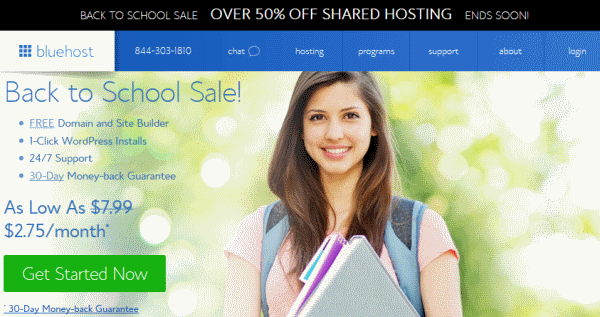
Use any BlueHost link on this site by September 1st to make sure you get the special BlueHost Back to School Sale price of $2.75 per month. BlueHost compensates me when you purchase through my link, so my services are free of charge to you! In fact, if you have any trouble at all setting-up your blog with this tutorial, just contact me and I will do it for you.

1. Click here to get the BlueHost Back to School Sale price of $2.75 per month by September 1st and then click “get started now”.

2. Select your plan. I recommend that new bloggers get the basic plan. Click “Select” to choose your plan.

3. Type in your domain name in the left box and then click “next” to start the registration process.

  • If you already own a domain name and want to use it for your blog, type your existing domain in the right box and then click “next”. Only use the right box if you have previously paid to register a domain!

4. Fill out your billing details on the registration page.

5. You will also need to choose your hosting package and options.

  • The 36 month package gets you the lowest monthly rate, while the 12 month package has a lower up-front cost. Remember, you can cancel anytime.
  • uncheck the boxes next to the other products when I sign-up. You can always get these products later if you decide you need them.

6. You will then need to create a password for your account. Once you do that your blog software will be automatically installed. Click “Log Into WordPress” to be taken to your blog.

You should also receive an email with your blog log-in details. (NOTE: The login details for your blog will be different than for your BlueHost account.)
Having trouble installing your blog? Get help here.
 

Step 3: Customize your blog

Logging in

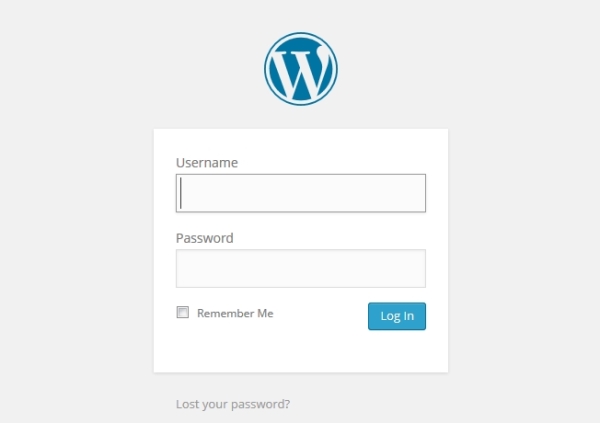
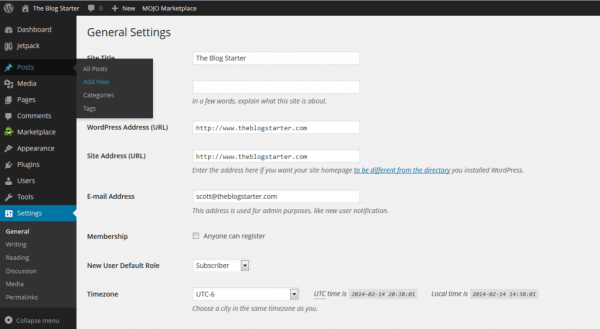
To start with, you will need to login to your blog. Go to http://www.yourblog.com/wp-admin to bring up the login screen (replace “yourblog.com” with your domain name). If you are unsure of your login name or password, check the email that was sent to you from BlueHost that has this information.

Changing your blog design

Once you login you will be in the WordPress administrator area. This is where you can make any changes you want to your blog.
Everyone has a different idea of how they want their blog to look. One of the great things about a WordPress blog is that you can change your entire layout and design with just a few clicks.
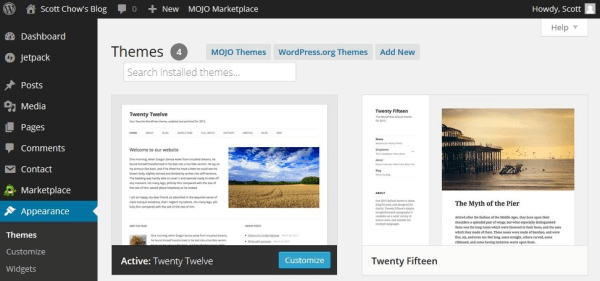
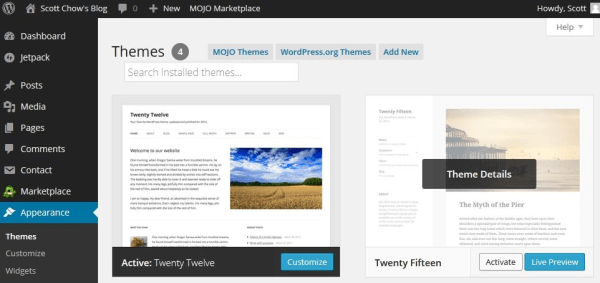
In WordPress, blog layouts are known as “Themes”. What is a blog theme? Themes control the entire design of your blog. To change your theme you are going to click on the “Appearance” tab on the left menu.
You will see several themes are already installed on your blog: Twenty Seventeen, Twenty Sixteen, etc. These are well-designed, clean-looking themes that can work for just about any type of blog. In fact, many of the world’s top bloggers use one of these themes.
Unless you have a very specific design in mind for your blog, I suggest you use one of these themes to start with. For our example, let’s use the “Twenty Twelve” theme. In order to activate the theme on your blog, hover over the theme and click the “Activate” button. That’s it! You have changed the entire design of your blog with just one click!

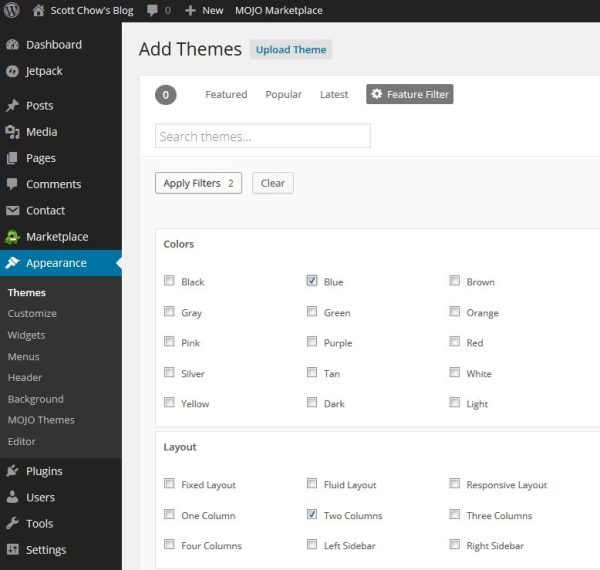
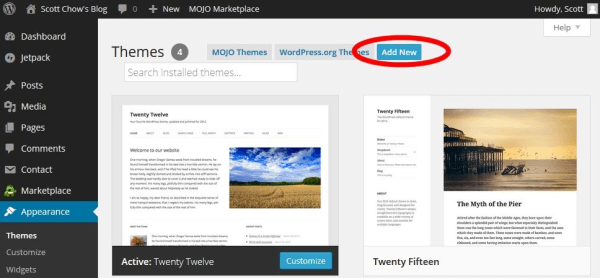
If you don’t like any of the themes that are already installed you can easily choose from thousands of other free themes. To install a new theme, click on the “Appearance” tab on the left menu and then click “Add New”.
This is the theme search screen. By clicking the “Feature Filter” you can search by color, layout, and more. Check the boxes that you want and then click “Apply Filters”.
Now you can browse the themes that have the characteristics that you want. When you find one that you like click the blue “Install” button.
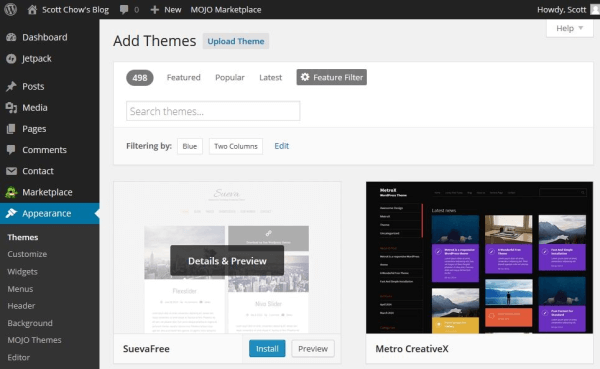
Once the theme is installed click “Activate” to activate the theme on your blog. To see your new theme in action, go to your blog and take a look!
Changing your theme is the simplest way to customize your blog, but there are lots of of other customizations you can do. Check out my full post on customizing your blog for an in-depth step-by-step guide. You can also watch the video at the end of this guide to see me completely customize a blog from scratch.
 

Step 4: Write & publish your first post!

Now that your blog is up and running it’s time to actually do some blogging!
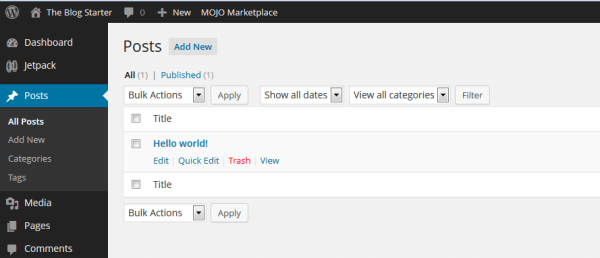
Go to the left menu and click on “Posts”.
You will see there is already a post there. This is a default post on every new WordPress blog, and we don’t need it. To delete it click “Trash” just under the post.
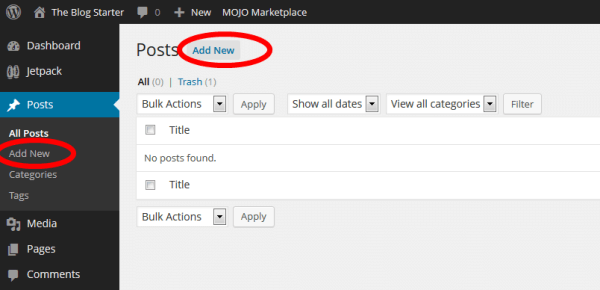
To begin writing a new post, click the “Add New” link.
You are now on the post editor screen. Enter the title of your post in the top box and then begin writing your post in the lower box.
If you would like to add a picture to your post, click on the “Add Media” button and click “Select Files” to upload a picture from your computer. You can make adjustments to the picture size on the next screen. When you are ready click “Insert into post” to add the picture.
Once you have finished your post just click the “Publish” button on the right side of the screen to publish it.

Publishing Your Blog

Even after you have written a post your blog may still be showing a “Coming Soon” page.
When you are ready to make your blog public just click the link near the top to remove the “Coming Soon” page.
Congratulations! You now know how to publish content on your blog!

Step 5: Promote your blog

Creating a well-designed blog and writing great content is just the start. In order to get readers for your blog you will need spend some time promoting it, especially when you first start.
One of my favorite ways to get readers to my blog is to post links on my social media accounts like Facebook and Twitter. This is great, because not only do your friends see the link, but if your friends share the link with their friends it automatically multiplies your readers. If you have created high-quality content on your blog then social media is a great way for your blog to go viral.
In addition to getting new readers to your blog, you will also want to make sure your current readers are coming back. This is where email marketing plays a big role. By collecting the email addresses of your visitors (with their permission of course), you can then notify them when you post something new on your blog. This keeps people coming back to your blog, which not only gives you more readers over time, it also allows you to build a closer relationship with your readers.
Email marketing is too big a topic to cover well here, so I created a separate guide to email marketing for those who are interested (hint: every blogger who wants more readers needs to read this guide).
For more tips on promoting your blog make sure to check out my in-depth guide to blog promotion.

Wednesday, 23 August 2017

Step to make money

40 easy ways to make money quickly
On this page you'll find all the best ways to make money in your spare time whilst at university based on our own experience. We'll keep adding new ways to this page so go ahead and bookmark it. And please do share your own ideas in the comments!

1. No-risk matched betting.

Hands down the quickest way to make a lot of money (well, without breaking the law). Lots of students have genuinely made £100s from this technique. It's completely legal, risk free, tax free, and anyone can do it.
It works by taking advantage of free bets regularly offered by betting sites through 'matching' them at a betting exchange. Matched betting eliminates the risk (you are betting both for and against a certain outcome).
This leaves you being able to squeeze out the free bet, which can be as much as £200! Multiply this by how many betting sites there are and you can quite easily come away with a profit of a few hundred pounds.
Owen walks you through how to make your first £15 profit (using a real life example) in this gem of a guide to matched betting. If you know of any better way to make £30/hr sitting at home, please let us know!

2. Online surveys.

An increasingly popular way for students to make money is to fill out online surveys in their spare time. Research companies are always recruiting new members to answer surveys and test new products.
For a few minutes of form filling, you can make a couple of quid which is paid as cash or rewards. You can bag up to £3 ($5) for some surveys!
Also sign up for Swagbucks which rewards you for surveys as well as simply surfing the web, watching videos and playing games.
Update: See our new full guide to the best paid online surveys!

3. Paid for searching the web.

Interested in earning cash for doing what you already do online? This has to be one of the easiest methods of making money online without really any effort or change in your behavior.
This innovative idea by Qmee.com rewards you for searching in Google, Bing or Yahoo. You just install a simple add-on to your browser and when you conduct a search there may be a few sponsored results alongside your normal search.Sign up now for free and start earning from your own searches! Click here to start.

4. Online market trading

The historically hard-to-break world of investing in stock markets and currencies has been cracked wide open. Today there is no need to be a fat cat or fund the yachts of Wolf of Wall Street style stock brokers. You can do it all yourself with the help of online market trading platforms.
Having spent many hours researching this new opportunity, I've been experimenting with the two biggest platforms: Plus500 and eToro.com.
Both offer free practice accounts, and Plus500 also give you a free £20 (without depositing, terms apply) for their CFD service which is worth taking up. Overall I prefer eToro with over 4.5 million users worldwide. It was recently featured in the BBC 2 documentary "Traders: Millions by the Minute" and the Financial Times.
One of the best things on eToro is the CopyTrader feature. This lets you literally see, follow and copy the investments of other top performing traders.
Follow George's complete guide to trading on eToro to learn more. I think $200 is a good amount to get the most out of the learning curve by trying out a few different markets. If nothing else you'll learn a great deal about various investments and industries.
Disclaimer: CFD trading can be volatile and you can lose your entire capital, so don't throw your life savings into it! Trading CFDs may not be suitable for you. Please ensure you fully understand the risks involved.

5. Start your own website.

Interested in generating passive income? You need a website. It's THE way to make money while you sleep.
Starting a website with Bluehost takes less than 20 minutes, costs hardly anything and can be done by an 82 year-old. It only takes a bit of plugging on social media to get your first visitors, and there are plenty of ways to monetise your site.
Save the Student is just one example of a successful website, started at university by Owen Burek in his first year, which has since grown into a full-time and sizable enterprise.
Read Owen's step-by-step guide on how to start a website in 20 minutes. It's really one of the best assets you can have.

6. Review websites & apps for cash

Well it seems like you're pretty nifty with a web browser, so perhaps it's time to turn pro and browse websites as a paid and fun job!
Introducing UserTesting.com – a new platform that pays everyday people to review all kinds of websites. Each review takes around 20 minutes and bags you $10 (£6.50) via Paypal.
Simply sign up here, complete a test review and look forward to receiving websites in your inbox.

7. The 'Disney Vault' secret

To keep demand high across generations, Disney Studios carefully restrict the supply of some home release classics. They are locked away in the 'vault' for 8-10 years before being released for a short unspecified time.
Buy them in this window at normal retail price and you can turn a nice profit when they go off sale for another decade or so.
For example, in 2011 you could buy Beauty and the Beast on Blu-ray 3D for just £24.99. In just a couple of years it was on Amazon for a staggering £74.99!
Importantly, not all Disney releases are subject to the vault and only the true classics will maintain such demand.
Right now there are just 2 titles out of the vault which I would recommend snapping up. They are Bambi Diamond Edition Blu-ray and The Lion King Diamond Edition Blu-ray.

8. 'Get Paid To' sites

Similar to making money from online surveys, GPT sites reward you in cash and vouchers for completing various offers or activities online.
The most popular sites today are TolunaSwagbucks and InboxPounds.

9. Become a delivery rider or driver

Got a bicycle, motorbike or car? What about a Smartphone? That's all you need to make some extra money by delivering food or people whenever you've got some spare time.
Sign up as an Uber Driver and you can also apply to deliver with Uber Eats who are always on the hunt for new riders. They allow you total flexibility to work when you want, delivering food from restaurants to the customers' door. You can make around £15 an hour.
Double-up your opportunities by directly contacting local takeaways and bigger chains like Dominos to see if they have any delivery jobs going.

10. Write and publish a Kindle eBook

If students are good at anything, it's researching and writing. With the Amazon Kindle storeanyone can publish an eBook and make money.
And the Kindle app is now available on almost any device (laptops, iPads, smartphones and yes, Kindles) so your global market is huge!
List your book for £1.49 – £6.99 and you earn 70% of the sale. Considering Amazon is the ultimate selling machine (and remember people are looking to spend), that is a fantastic deal.
The key to success with eBooks is to create value, and write non-fiction. Simply bundling information you have researched and complied on a common problem (eg. 'secrets' to finding a job) and then presenting it in an easy to digest format (an eBook) justifies someone spending a few quid on it.
Another big tip is to have a great cover designed so it stands out, and once your book is live on the Kindle store it's really important to get some reviews so it shows up higher in results. Encourage readers to leave an honest review at the end of your book.
The best thing about this lucrative idea is that once you've invested the time (say 20 hours), you'll earn a passive income for years to come! For a step-by-step guide to publishing and earning with eBooks, see "How to write a nonfiction eBook in 21 days".

11. Affiliate marketing

If you've got a good presence on social media or perhaps you even have a blog or website, you can start bringing in money immediately by promoting all sorts of companies, products, services and offers online.
Sign up as a publisher on the Awin network, check their offers blog or browse the merchant listings to find something you think your friends would be interested in, grab your affiliate link and share it. If someone buys (can be within up to 90 days) using your link you'll make a nice commission.
To take it a step further, set up a website (read our guide) or a topical Facebook page and invite all your friends to join it and post your affiliate offers on there.